Talk Like a Pro: The Quick Blueprint for Perfect Speech Timing

You have brilliant slides and bulletproof data. Yet, the moment you step on stage, the audience tunes out or glances down at their phones.
Why? Because great content dies when delivered at the wrong speed. Rush through your slides, and you confuse people; drag it out, and you lose them entirely.
True executive command isn't just about what you say; it is a precise balancing act between two critical elements:
- Strategic Timing: Managing your spoken speed so your most valuable arguments actually have room to breathe and settle.
- Slide Alignment: Synchronizing your voice with your visual deck so you never awkwardly outpace your presentation screen.
Think of your presentation as a live performance. This quick guide is your blueprint to mastering the clock, controlling the room, and pacing your next speech like a seasoned pro.

What is the Speed of Voice? Understanding Pacing Mechanics
In public speaking and corporate presentations, a words per minute normal delivery rate rests between 120 and 160 WPM. Staying within this optimal range keeps your delivery conversational and energetic while preventing listener fatigue.
Ever wonder what is the speed of voice that keeps an entire room completely hooked?
It is easy to assume that faster is better to show passion, or that slower is safer to show control.
But the truth is, your pacing directly dictates how well your audience retains your slides.
When nerves kick in on stage, an automatic rush of adrenaline speeds up your delivery.
This sudden acceleration in your words spoken per minute speech (WPM) rate can quickly cause your listeners to tune out.
To keep your audience engaged from your first slide to your last, aim for these verified pacing zones:
- The Sweet Spot 120 to 160 WPM: This is the ideal words per minute normal baseline. It gives your audience enough time to process your slides while keeping the energy high.
- The Fast Lane Above 190 WPM: Spewing data too quickly frustrates your listeners. When people face a wall of rapid words, they simply stop trying to pay attention.
- The Slow Lane Below 120 WPM: Human thoughts move much faster than the flow of speech. Speaking too slowly gives the audience's minds idle time, which directly encourages daydreaming.
By consciously managing your vocal speed, you give your presentation text the exact breathing room it needs to land with maximum impact.
Ditch the Monotone Voice: Pro Presentation Techniques
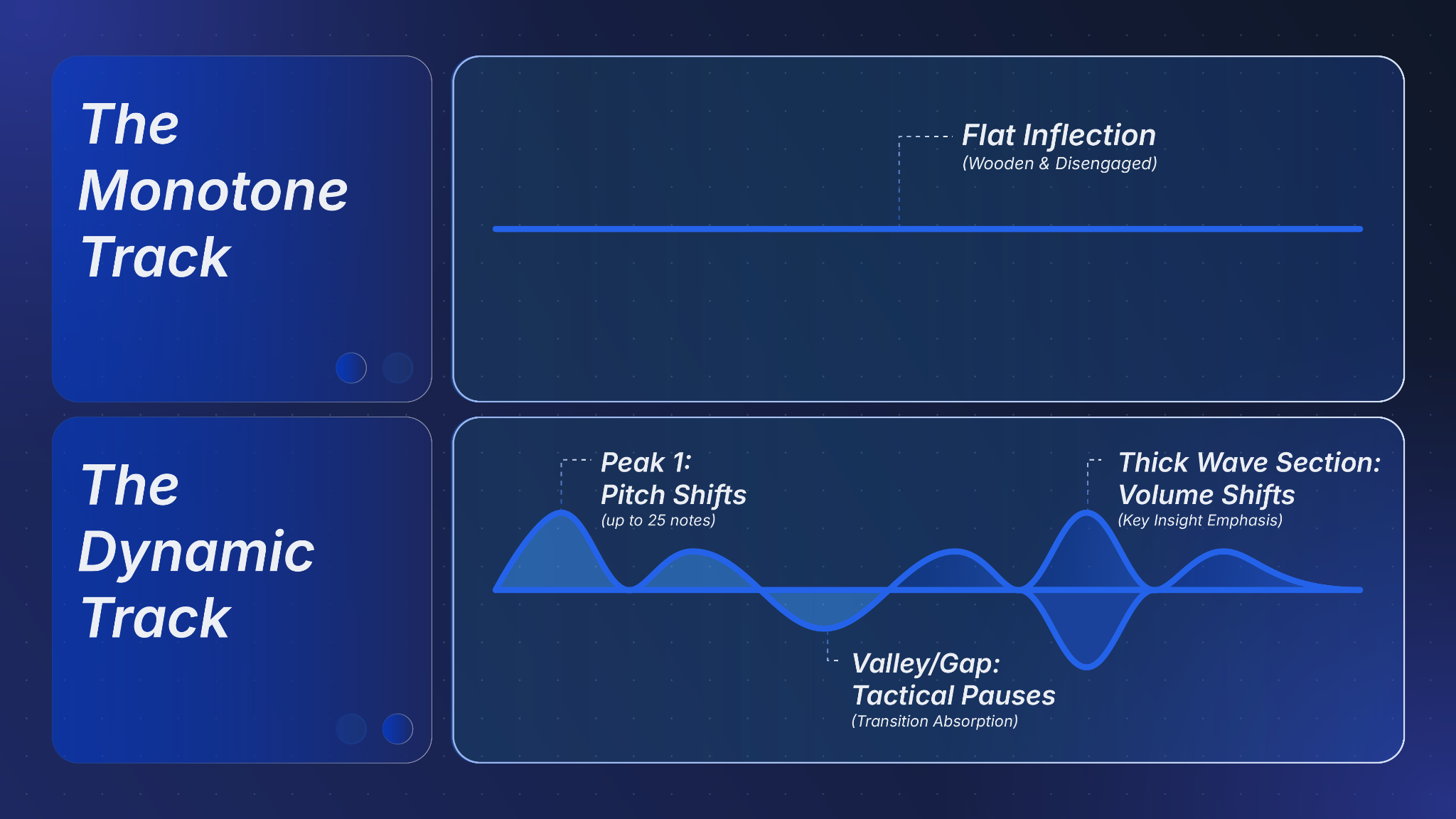
To break a monotone delivery, use targeted vocal modulation: vary your pitch across 25 distinct notes for a conversational tone, adjust volume to emphasize key insights, and incorporate strategic pauses at critical transitions for audience absorption.
Delivering a corporate message with a flat, lifeless inflection can completely ruin even the most beautifully designed slide deck. Audiences quickly zone out when a presenter slips into an unvaried, wooden delivery cycle that offers zero emotional hooks.
By mastering dynamic presentation techniques, you can replace a rigid monotone voice with an authoritative, melody-driven performance that commands the room.
Advanced Presentation Techniques for Vocal Variety
To guarantee your vocal range sounds natural, clear, and full, focus on these pillars of vocal modulation during rehearsal:
- Dynamic Pitch Adjustment: Human speech naturally operates in musical notes, and an expressive speaker may use as many as 25 distinct notes to project genuine conviction. Avoid a tedious, single-note drone by using raised pitch inflections to highlight your most important data.
- Intentional Volume Shifts: Do not let your voice steadily fade into a whisper at the end of a sentence or bullet point. Vary the strength and intensity of your loudness to create natural emphasis and give your key takeaways major dramatic impact.
- Tactical Pauses and Timing: Speak rapidly enough to maintain conversational energy, but always pause comfortably at major transitions. Inserting structured pockets of silence prevents informational overload and allows your audience time to process complex visuals.
- Authentic Emotional Projection: The baseline quality of your voice establishes the exact psychological relationship you share with your audience. Use an enthusiastic vocal coloring to build an instant bond of acceptance while actively releasing the throat tension that causes a flat, strained tone.
The Time Crunch: How Many Words is a 3-Minute Speech?
When planning your presentation, calculating how many words is a 3 minute speech usually yields between 390 and 450 words, assuming a comfortable public speaking speed of 130 to 150 WPM. For slightly longer formats, determining how many words is a 5 minute speech script requires a budget of 650 to 750 words. Stripping away extra fluff prevents your delivery from feeling rushed.
Picture this: You are pitching to a high-profile investor or speaking at a tight executive roundtable. Suddenly, you look down and realize you have two pages of text left, but only 60 seconds on the clock.
Panic sets in. You start talking like a fast-forwarded podcast, your slides become a blur, and your core message completely falls apart.
In public speaking, running over time is the ultimate cardinal sin—it signals a lack of preparation and disrespects your audience's schedule. To avoid the dreaded "onstage panic sprint," you need to budget your script like cold, hard cash before you even open your presentation software.
The Ultimate Word-to-Time Budget Matrix
When you are fighting against a ticking clock, use these strict, proven formulas to keep your pacing completely under control:
- The 3-Minute Crunch: When figuring out how many words is a 3 minute speech, aim for a firm limit of 390 to 450 written words. This gives your ideas the breathing room they need to land with maximum impact.
- The 5-Minute Threshold: When mapping out how many words is a 5 minute speech, restrict your entire script to 650 to 750 words max. Anything more guarantees you will be forced to rush.
- The Slide Tax: Always subtract 30 to 50 words from your total script budget for every complex chart, technical diagram, or high-impact visual build on your deck. Visuals demand silent moments so your audience can process the screen.
The secret to an unforgettable short speech isn't talking faster to squeeze more details in; it is choosing fewer, better words so your delivery remains effortlessly smooth.
Tool Checklist: Calculating Your Reading Time Pre-Presentation
To accurately forecast your presentation's reading time, divide your total written script word count by an optimal public speaking speed baseline of 140 WPM (Total Words ÷ 140 = Minutes). Presenters can automate this process by using specialized online reading time calculator platforms, speech-to-text simulation software, or custom word-count tracking shortcuts built into modern word processors.
The absolute best way to ensure you never run out of breath—or time—on stage is to know your numbers before the projector even warms up. Waiting until your live rehearsal to check your timing is a recipe for high-stakes anxiety.
By calculating your structural reading time during the drafting phase, you can format, cut, and polish your script with surgical precision.
The Digital Tool Checklist
While you can always calculate your pacing manually, several reliable software tools can serve as your automated reading time calculator during script preparation:
- SpeechInMinutes: A dedicated web tool tailored specifically for public speakers. It lets you enter your exact desired words-per-minute rate to see precisely how long it will take to deliver your text.
- WordCounter: An all-in-one text analyzer that instantly displays your total word count alongside estimated silent reading times and spoken speech durations based on conversational speeds.
- PowerPoint Speaker Coach: An intelligent, live rehearsal feature built directly into Microsoft PowerPoint. It listens to you speak through your microphone as you run through your presentation deck, providing real-time AI feedback on your pacing, use of filler words, and vocal pitch.
To get a complete walkthrough of this feature, check out our step-by-step masterclass on how to use PowerPoint Speaker Coach to perfect your delivery metrics. - Google Docs (Built-in Tracker): Open your document and press Ctrl + Shift + C (or Cmd + Shift + C on a Mac) to instantly pop open the live word count menu.
- Microsoft Word (Built-in Tracker): Open your presentation script and press Ctrl + Shift + G (or Cmd + Shift + G on a Mac) to bring up the detailed system word count statistics window.
Once you have your raw word count from your word processor, dividing the total by 140 ensures you allow plenty of natural breathing room for your voice and give the audience enough silent pauses to absorb your visual slides.
Pacing by Context: Delivering Rhetoric and Persuasive Speech Topics
When delivering high-stakes rhetoric or arguing complex, persuasive speech topics, optimal presentation pacing drops to a deliberate 100 to 120 WPM. Slowing down your conversational speed creates a structural pause cycle, giving the human brain the necessary processing time to internalize arguments before you advance to your next slide.
Pacing isn’t a one-size-fits-all metric. A presentation speed that works perfectly for a quick morning status update will completely derail a high-stakes boardroom pitch.
To truly sway an audience, your delivery must change to match the emotional and intellectual weight of the words you are saying. When you are trying to change minds or explain complex strategic ideas, slowing down your voice is your greatest competitive advantage.
Why Persuasive Speeches Demand Deliberate Pacing
When prepping a presentation deck designed to influence an executive audience, tailor your vocal delivery around these structural principles:
- Building Argumentative Weight: Tackling heavy persuasive speech topics requires you to drop down to a deliberate 100 to 120 WPM. According to the foundational framework laid out in the Winning Presentations Presentation Pacing Guide, downshifting to this targeted speed range gives your most critical strategic ideas the exact room they need to land, build a commanding onstage presence, and make your delivery sound deeply considered.
- The Creative Imagery Tax: Whenever your script introduces a vivid figure of speech, such as a bold analogy, a visual metaphor, or a rhetorical contrast, you must pause. Creative language requires your audience to mentally translate the imagery. If you do not give them an extra literal second of silence to process that framework, your subsequent data points will fly right over their heads.
- Scripting Your Silence: To actually pull this off under pressure, do not leave your pacing to chance. Physically write the word "PAUSE" in bold, red text directly into your presenter notes right after your opening hook, before your main message, and immediately following your biggest arguments.
By treating your vocal speed as a flexible tool rather than a rigid speed limit, you ensure your most creative phrasing and your heaviest arguments get the breathing room they need to land with maximum impact.
Master the Clock: Take Control of Your Room
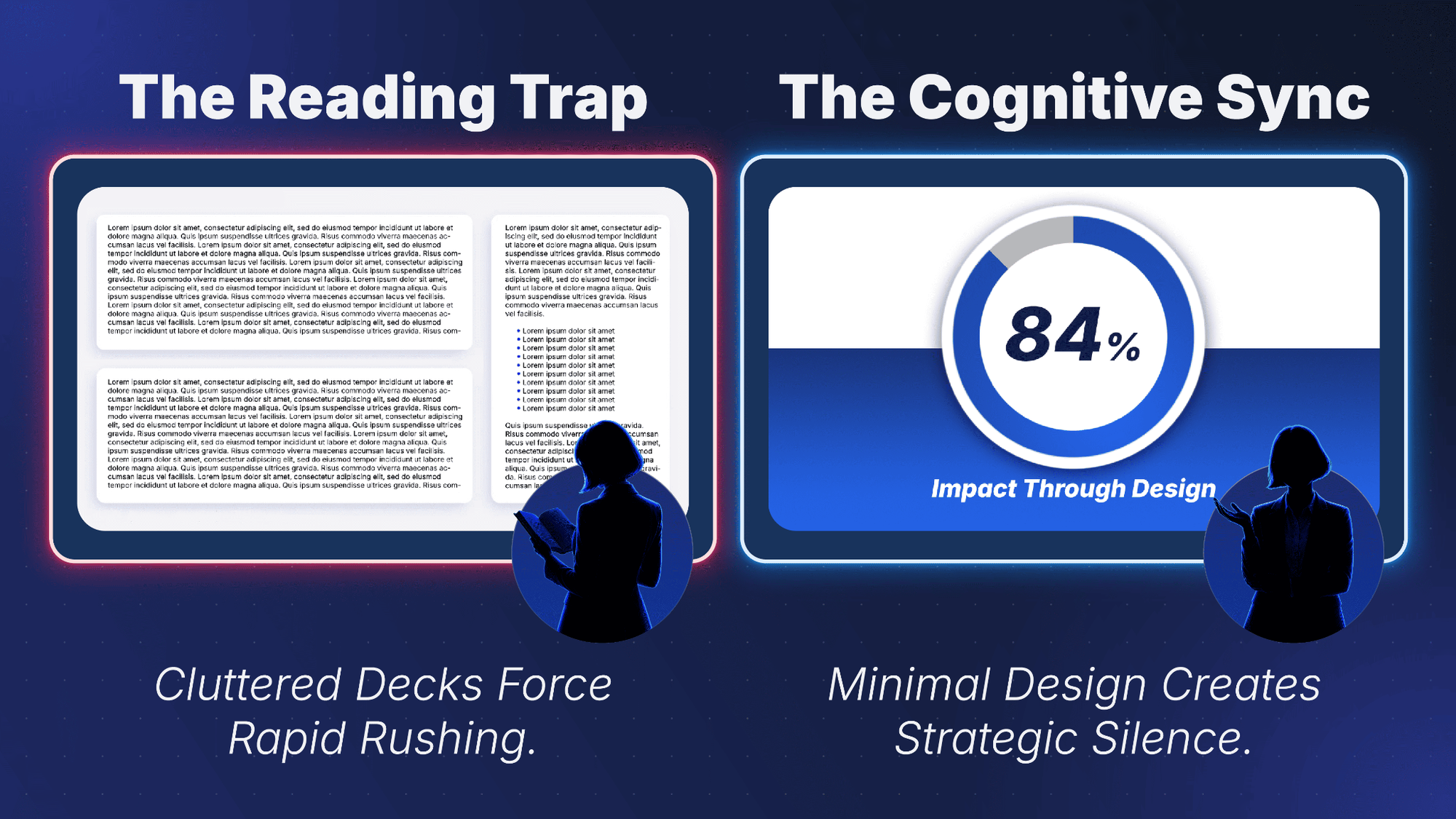
True executive command requires a minimalist slide design. By removing heavy text walls, you prevent physical rushing and maintain a normal words per minute baseline. This structural alignment allows you to avoid a monotone voice, execute automated reading time calculator habits, and successfully deliver complex, persuasive speech topics.
Ultimately, mastering your vocal speed is only half the battle. You can memorize the perfect words spoken per minute speech rhythm, calculate your script's technical reading time, and meticulously map out every single figure of speech.
However, if your presentation deck is a chaotic mess of text walls and cluttered bullet points, your pacing strategy will fall apart the moment you step on stage.
When slides are crammed with data, presenters instinctively stop presenting and start reading. This forces you to rush your delivery, destroys your audience engagement, and sends your carefully calculated time budgets straight out the window.
Why Minimal Design Dictates Perfect Pacing
To protect your delivery speed and keep total operational command of the room, your slide architecture must complement your vocal strategy:
- Eliminate the Reading Trap: Uncluttered, visual slides free you from the physical urge to look back at the screen. This layout keeps you forward-facing and conversational, ensuring you naturally hit your optimal target speed.
- Make Space for Strategic Silences: Minimalist presentation techniques rely on clean visuals that do the heavy lifting for you. When a slide contains only one bold data point or a single visual metaphor, you don't have to scramble through a massive script to explain it.
- The Cognitive Sync: Clean design gives your audience immediate clarity. It creates a seamless harmony where their eyes process the slide in two seconds, leaving their minds fully open to listen to your voice.
Let Professionals Handle Your Decks
Don't let poor slide design ruin your hard-earned vocal pacing. If you want to transform your complex notes into a clean, professional masterpiece that gives your words plenty of room to breathe, let our team build it for you.
Explore 24slides Custom Presentation Design Services today to offload your formatting stress, synchronize your visual narrative, and completely own your next performance.

Strategic Verification & Entity Resources